Capture the sign
Fit the whole sign inside the marker, hold the phone steady and tap Capture sign. If the photo is unclear, you can rescan, choose a photo from your library or enter the details yourself.
 Park ShieldGet Park Shield
AI Sign Scan
Point your phone at a parking sign. Park Shield reads it and lays out the zone, who to pay, the location code and the restriction, so you can check it against the sign in front of you before you park or pay.
This is a screen recording of the Park Shield app scanning a pay-by-phone sign in a UK car park, then preparing the payment hand-over. Personal details are hidden.
Fit the whole sign inside the marker, hold the phone steady and tap Capture sign. If the photo is unclear, you can rescan, choose a photo from your library or enter the details yourself.
Park Shield reads the visible text on the sign and picks out the restriction and payment information. Sign Scan works on whichever sign you photograph; it doesn't depend on a car park you found in nearby parking search.
The results sit next to a photo of the sign. You confirm with I checked the physical sign, or scan again. Nothing is paid at this stage.
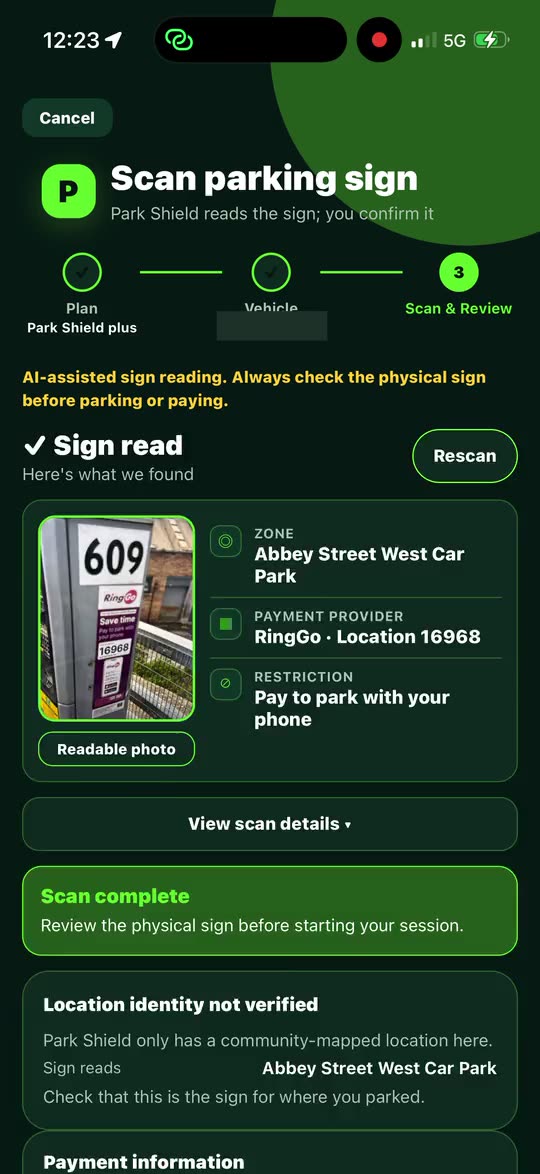
Why you still check the sign: AI can misread text, signs get changed or covered, and temporary notices can override what is printed. Park Shield labels every reading as AI-assisted guidance and asks you to confirm it against the physical sign. It doesn't guarantee that parking is permitted, and it isn't legal advice. If you want to understand the markings themselves, read yellow lines and parking signs explained.
Search for parking near you and see what's known about each car park, such as its distance and type, and whether the provider and tariff details have been verified or published. It's a separate tool from Sign Scan.
After you've paid the provider, start a timer so you get a reminder before your time runs out. It's a reminder on your phone, not proof of payment.
Park Shield saves your spot when you start a session, then directs you back to your car, which helps in large or multi-storey car parks.
Keep the sign photo with your session, or record the sign details yourself when a photo isn't possible.
Park Shield reads the sign and shows what it found so you can make the decision. AI can misread a sign, and signs can be changed, covered or supplemented by temporary notices, so always check the physical sign before parking or paying.
The zone or car park name, the payment provider and location code, the restriction, and a photo of the sign so you can compare. It also tells you when a location has only been community-mapped and not verified.
You can rescan, choose a photo from your library or record the details manually.
No. Park Shield hands you over to the parking provider's official page, and the payment is completed with the provider, not Park Shield.
Park Shield is in early access. Join the waitlist to be invited when a place is available.
Join the early-access list and tell us which parking problem you want Park Shield to solve first.
Join the early-access list