How the hand-over works
1Find the payment details
When you scan the parking sign, Park Shield picks out the payment information printed on it: the provider, the location code and the machine number where there is one. For example: RingGo · Location 16968 · Machine 609. You can also go to a provider's payment page from a car park you chose in nearby parking search.
2Check the sign first
You confirm the scan against the physical sign before going further. If you've also selected a car park, Park Shield shows the name the sign reads and says Location identity not verified when it can't confirm they match, so you can check you're paying for the right place.
3Review the hand-over
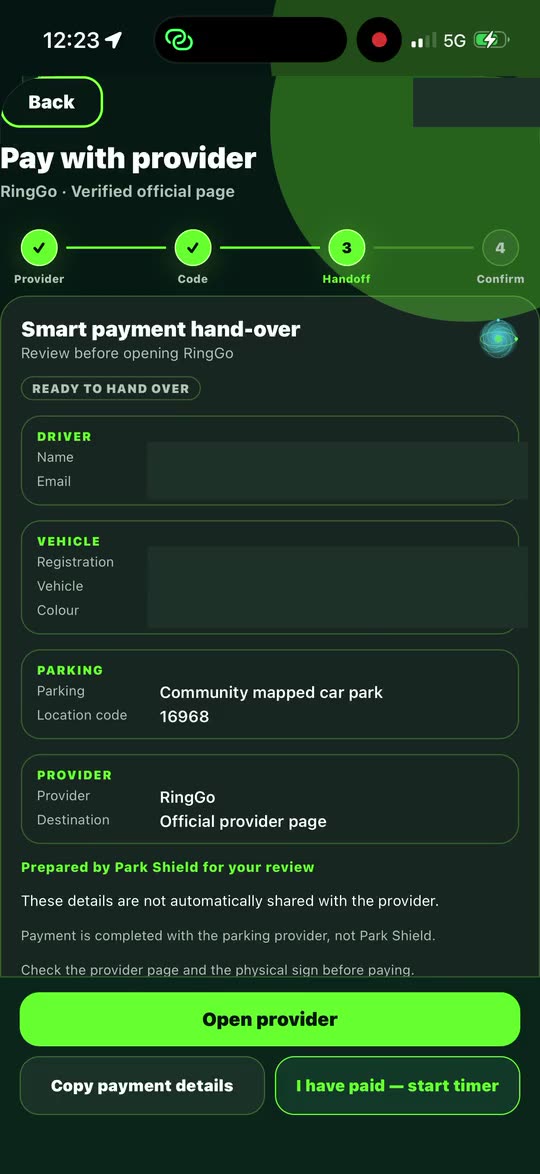
The review screen walks through four steps (provider, code, hand-off, confirm) and shows the driver, vehicle, location code, provider and destination together. Opening it doesn't start a payment.
4Open the provider
Tap Open provider to go to the provider's official page, or Copy payment details to paste the location code and registration into it. Your details aren't sent to the provider automatically.
5Verify on the provider's page
Before you pay, check that the location code and the car park on the provider's page match the sign where you parked, along with the tariff and maximum stay.
6Get the provider's confirmation
Payment is completed with the parking provider, not Park Shield, so the provider's confirmation is your proof. Then tap I have paid — start timer for a reminder before your time runs out.
What is a parking location code?
Pay-by-phone signs and machines carry a location code (some providers call it a location number). It tells the provider exactly which car park or zone you are paying for. Neighbouring car parks, and even different areas of the same car park, can have different codes and tariffs, so the code needs to come from the sign where you actually parked. Read more about avoiding the wrong app or code and what to record if a payment fails.
Frequently asked questions
Does Park Shield process my parking payment?
No. Park Shield opens the parking provider's official page and you pay the provider there. Payment is completed with the provider, not Park Shield.
Are my details sent to the parking provider?
Not automatically. Park Shield prepares the details for you to review, and you can copy them into the provider's page yourself.
What is a parking location code?
It is the number printed on pay-by-phone signs and machines that tells the provider which car park or zone you are paying for. Paying with the wrong code can leave you without valid payment for where you actually parked.
Does starting the Park Shield timer mean I have paid?
No. The timer is a reminder on your phone. Your proof of payment is the confirmation from the parking provider.
 Park ShieldGet Park Shield